What's new in desktop beta v3.20.14
A new search, text size and density settings, more sidebar options, and other improvements.
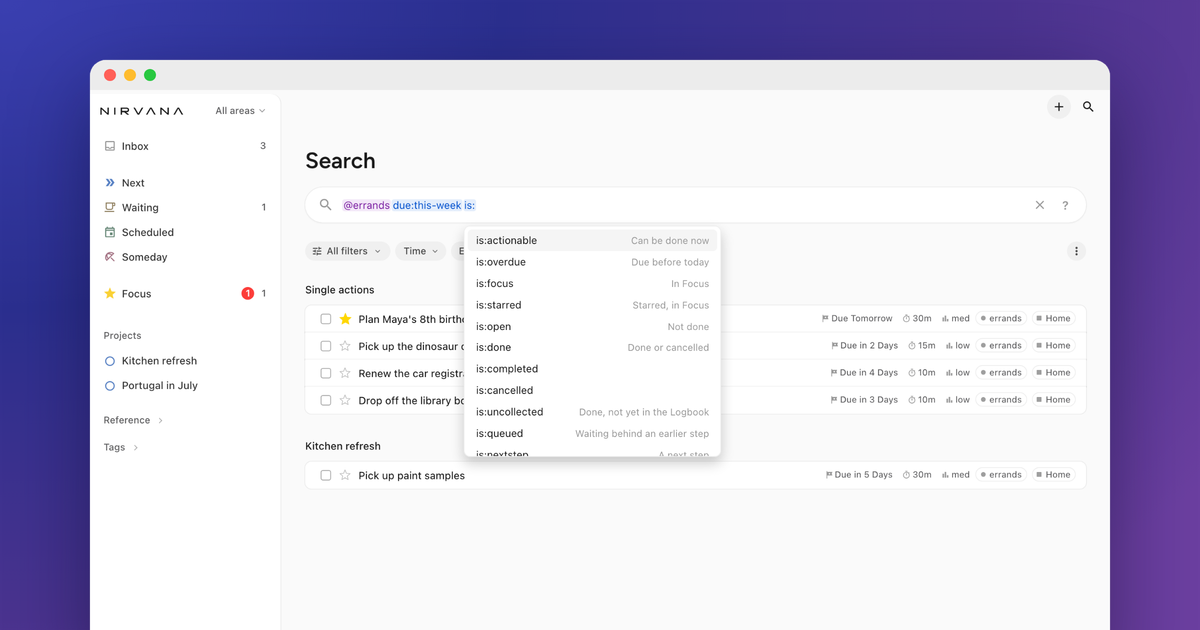
Thanks to everyone who has tried the desktop beta and sent feedback. Here's what has changed since the last update.
What's new
- Search: Search has been rebuilt. You can type words as before, or use search terms such as
in:next,@callsordue:today. Terms are highlighted as you type, suggestions help complete them, and the ? button next to the search box lists them all. - Recent searches: Press ↓ in an empty search box to see your recent searches. They are stored on device and cleared when you sign out.
- Hidden matches: If something matches your search but is in an inactive project or the Logbook, search shows how many, and you can click to see them.
- Speed: Search, large lists, tags and the Logbook are faster, especially in accounts with many to-dos.
- Text size and density: Settings › Appearance now has text size and density options.
- Features: In Settings › Workflow › Features you can turn off Focus, Later, Waiting or Reference lists. Turning one off doesn't remove anything you've already added.
- Sidebar: Right-click the sidebar to hide sections. Right-click a list to see its filters and view options.
- Starred to-dos: Starred to-dos can be shown at the top of any list, including Inbox.
- Tags: In Manage tags, "Show where it's used" lists the to-dos that have that tag.
There's also a Beta label in the bottom corner of the sidebar. Hover over it to see your version, or click it to open these release notes.
Try it
Go to beta-focus.nirvanahq.com and sign in. It uses the same account and data as your regular Nirvana. If you're already signed-in you may need to refresh your browser.
If something isn't working, or you have a suggestion, please let us know in the comments.